


What’s the first thing your audience notices when they tune into your stream? It’s not just your content, it’s what’s behind you. A striking, well-thought-out background can set the tone, reflect your personality, and make you look like a pro.
Let’s explore how to turn your streaming setup into a space that grabs your audience’s attention and enhances your broadcast.
Importance of a Professional Stream Background
Your background is more than just decoration, it’s a visual extension of your stream. A polished and intentional setup can help you connect with your audience while improving the overall quality of your broadcast.
Here’s why it matters:
- It makes a strong first impression. Viewers often decide whether to stay within seconds, and a polished background shows you take your stream seriously.
- It reduces distractions. A cluttered or messy background can pull attention away from your content. A clean, intentional setup keeps the focus on you and what you’re presenting.
- It enhances your branding. Your background is a way to showcase who you are. Whether it features your logo, brand colors, or other personal touches, it reinforces your identity and makes your content more memorable without needing extra explanation.
- It improves the viewer experience. A visually cohesive background makes your stream more enjoyable to watch. When your setup feels intentional and aligns with your content, viewers are more likely to engage and return in the future.
🎨10 Creative Streaming Background Ideas for Your Setup
A well-thought-out background setup can make your live streams look professional and engaging while showcasing your personal style or brand. Unlike virtual backgrounds, physical setups bring authenticity and depth to your content.
Here are 10 ideas to try:
1. Bookshelf Design

Source: https://bespokecarpentrylondon.co.uk/built-in-bookshelves-in-london/
A bookshelf adds character and a sense of sophistication to your background. Choose books or decorative items that reflect your niche or interests, such as novels, tech gadgets, or collectibles.
Organize the shelves neatly to avoid visual clutter, and add small plants or lights to create depth and warmth.
2. Minimalist Style
For a minimalistic look, stick to a clean, uncluttered background with neutral tones like white, beige, or gray. A plain wall with one or two simple accents, such as a sleek vase or a piece of framed art, keeps the focus on you. This setup works well for professional streams and interviews.
3. Artistic Wall
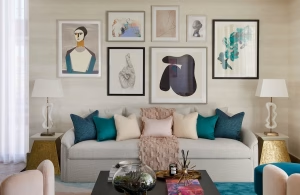
Source: https://www.luxdeco.com/the-luxurist/living-room-wall-decor-ideas
Are you an aesthete or simply like art? Display framed art, posters, or prints that align with your content theme or personal aesthetic. For a bold look, choose colorful or abstract pieces.
If you prefer minimalism, stick to simple black-and-white designs. Make sure the artwork is well-lit and doesn’t overpower your presence on camera.
4. Indoor Garden Scene
Bring life to your background with greenery. You can always just choose easy-to-maintain plants like succulents, pothos, or a fiddle-leaf fig.
Position them on shelves or in decorative pots to add texture and a refreshing natural element to your space. Avoid overcrowding the area, as too many plants can feel overwhelming.
5. LED-Inspired Glow
Another idea is to set up LED lights behind you to add a modern, dynamic touch. Wrap them around shelves, frames, or the edges of your walls.
Select colors that complement your branding or adjust the lights to match your mood. For streamers focused on gaming or tech, LED lighting can create a futuristic vibe.
6. Branded Backdrop
Want to make your brand the center of your stream? You can use a backdrop with your logo, brand colors, or a custom-made banner.
Alternatively, you can display items related to your brand, such as merchandise or tools you use. This not only reinforces your branding but also makes your stream look cohesive.
7. Memorabilia Wall
Depending on your niche, you may choose to showcase items that represent your journey or interests. That could be awards, certificates, photos, or collectibles.
Arrange them on shelves or directly on the wall to tell a story and make your space feel personal. This setup is ideal for creators who want to build a more personal connection with their audience.
8. Textured Visuals

Source: Grant Saunders on Be.Live’s YouTube Channel
A textured wall, such as exposed brick, wood paneling, or a patterned wallpaper, adds visual interest and depth.
These materials create a professional look without the need for additional decorations. If your space lacks natural texture, consider using peel-and-stick panels for an affordable upgrade.
9. Gaming Universe
If you’re into gaming, you can always highlight your gear by integrating it into your background. Showcase your gaming PC, console, or monitor setup with strategic lighting.
Add gaming memorabilia like posters, figurines, or themed wall art to emphasize your niche. Keep the space tidy to avoid a cluttered appearance.
10. Elegant Curtains
Last but not least, another simple and easy way to change your background style is by hanging curtains in your preferred color or texture to create a flexible backdrop.
If you need to control natural light or sheer curtains for a softer look, opt for light-blocking curtains.
✨How to Create the Best Background for Live Streaming: Simple Tips
Setting up a physical background for your stream requires thoughtful planning to ensure it complements your content.
Follow these tips to ensure your background enhances your stream without distracting your audience:
1. Keep It Clean and Uncluttered
Start with a tidy, well-organized space. Remove unnecessary items that could distract your viewers. A clean background keeps the focus on you and your message, whether you’re streaming from a home office, a gaming setup, or a shared space.
2. Use Good Lighting
Start with a tidy, well-organized space. Remove unnecessary items that could distract your viewers. A clean background keeps the focus on you and your message, whether you’re streaming from a home office, a gaming setup, or a shared space.
3. Choose a Theme or Style
Your background should match the tone of your stream. A sleek, minimalist design works well for professional or business-focused streams, while vibrant colors and fun props suit creative or gaming content. Aligning your background with your theme helps set the right mood for your audience.
4. Add Depth with Layers

Example of KM Robinson’s Background
Create visual interest by incorporating layers into your setup. For example, combine a bookshelf, a plant, and a textured wall for a multidimensional look. Layering adds depth and prevents your background from feeling flat or one-dimensional.
5. Incorporate Subtle Branding
Use your background to reinforce your identity. Display your logo, brand colors, or props that represent your niche. Keep the branding subtle to avoid overpowering your stream while still leaving an impression on your viewers.
6. Adjust the Camera Angle
Position your camera to capture the best angle of your setup. Avoid showing too much floor or ceiling, and ensure the key elements of your background are framed well. A slightly elevated angle focused on your face and upper torso works best for most solo streams.
7. Keep It Well-Maintained
A physical background requires regular upkeep. Dust your shelves, tidy your props, and ensure everything looks neat before going live. A well-maintained space reflects your professionalism and attention to detail.
8. Use Complementary Colors
 Examples of complementary colors (Source)
Choose colors for your background that work well with your outfit and overall stream aesthetic. Neutral tones, earthy shades, or colors aligned with your branding are safe choices. Avoid colors that clash with your setup or distract the viewer.
9. Soundproof Your Space
A visually appealing background won’t help if your audio quality is poor. First, make sure to have a microphone for livestreaming that matches your needs. Then you can use rugs, curtains, or foam panels to minimize echo and external noise. Even small adjustments can improve the overall professionalism of your stream.
10. Test Your Setup
Before you go live, test your camera, lighting, and sound. Check how your background looks on screen and adjust anything that seems out of place.
Testing ensures your setup is ready to deliver a smooth and engaging experience. With Be.Live, you can always do a test live stream, before the real thing.
Summing Up
A thoughtfully designed physical background enhances the quality and appeal of your live streams. Whether it’s a professional setup for work-related content or a creative space that reflects your personality, the right background helps you connect with your audience and deliver a polished experience.
From minimalistic designs to branded elements, there are countless ways to make your background stand out. With careful planning and the tips outlined above, you can create a backdrop that fits your style and keeps your viewers engaged.
Remember: Your background is more than just part of the frame, it’s a key element of your streaming success. 🧡
FAQ
What is the best background for live streaming?
The best background depends on your content and personal style. For professional streams, a tidy, minimalist setup works well. Creative streams might benefit from artwork or bold elements that reflect your personality.
What is the best background color for streaming?
Choose a color that suits your tone and content. Neutral tones like gray or beige are versatile, while vibrant or branded colors can add personality.
How can I make a good webcam background?
Match your background to your style. Keep it tidy, use good lighting, and include elements like plants, books, or artwork that reflect your theme.
What should I have in the background of my stream?
Your background should align with your content. Bookshelves, branded visuals, or personal items like photos or memorabilia can add character without overwhelming the scene.
What makes a good streaming background?
A good background matches your content, reflects your style, and avoids clutter. It can be simple, decorative, or themed, as long as it enhances the viewer experience.


